ChatGPT, developed by OpenAI, is a cutting-edge language model that has the ability to convert text to table form. This functionality can be useful for those who need to present data in an organized manner, for example, for data analysis or presentation purposes. In this article, we’ll discuss how ChatGPT can be used to convert text to table form.
- Understanding the Input Data: Before using ChatGPT to convert text to table form, it is important to understand the structure of the input data. The data should be organized in a tabular format with each row of data separated by a line break. Each column should also be separated by a delimiter, such as a comma or tab.
- Formatting the Input Data: Once the data is organized, it can be passed to ChatGPT as input. To ensure that the output is in the desired format, it is important to specify the delimiter used to separate the columns in the input data.
- Generating the Output Table: ChatGPT can then generate the output table based on the input data and the specified delimiter. The model uses its advanced language processing capabilities to recognize the structure of the data and produce a table with the correct number of rows and columns.
- Customizing the Output Table: ChatGPT also allows users to customize the output table by specifying the desired table format. This can include adding headers, adjusting the column width, or specifying the type of table (e.g. HTML, Markdown, CSV).
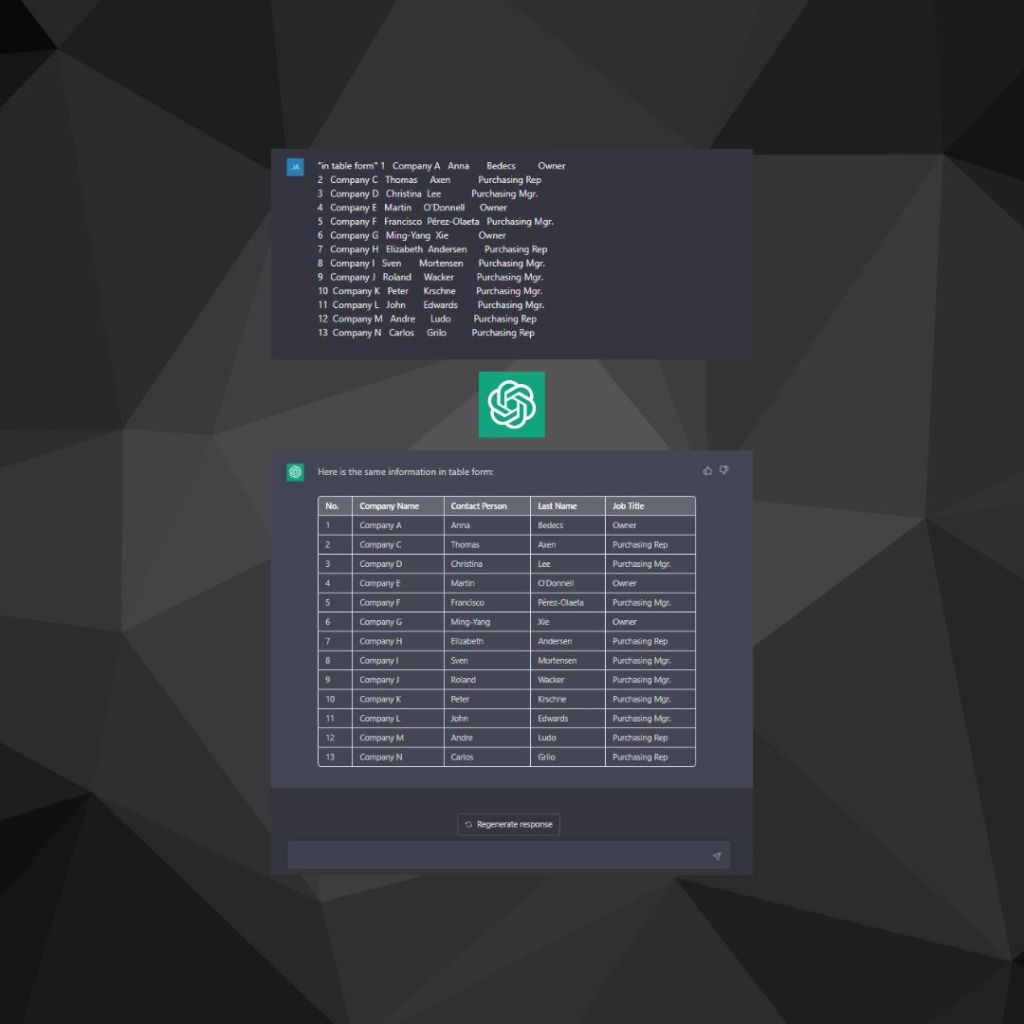
Example:
In this example we take some text from the Microsoft website to show how ChatGPT comfortably converts text into table form.
In conclusion, ChatGPT’s ability to convert text to table form is a valuable tool for those who need to present data in an organized manner. With its advanced language processing capabilities and customization options, ChatGPT is an efficient and effective solution for converting text data into table form.
 ChatGPT Novice
Leave a comment